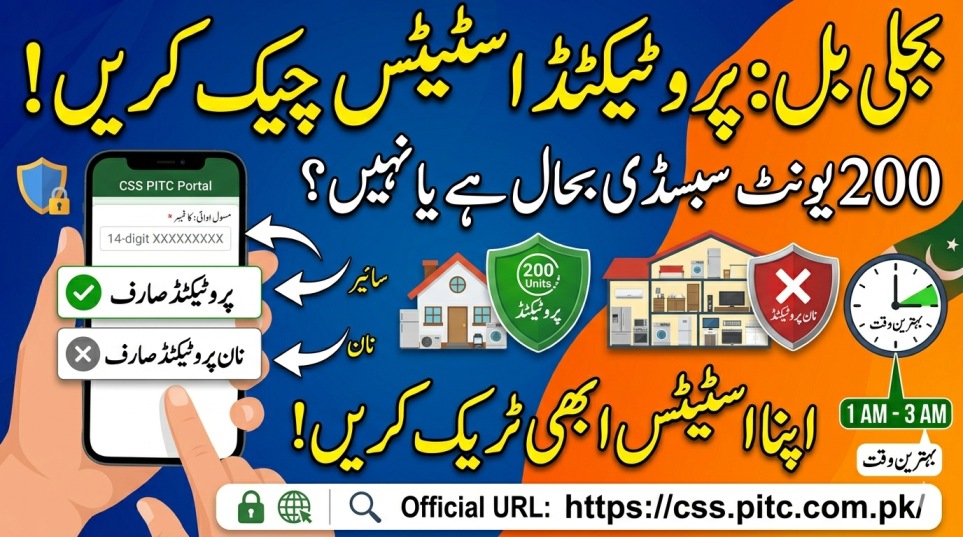
The Government of Pakistan’s Cross Subsidy Program 2026 has brought great relief to low-income households by subsidizing electricity bills for those who consume less than 200 units. However, to ensure you continuously receive this relief, you must maintain a specific status known as a “Protected Consumer”.
Many citizens face high bills suddenly because their status changes without their knowledge, or they face the “Too Many Requests” server error while checking their bill data online. Knowing exactly how to verify your protected status—and doing it at the right time—will save you from heavy taxes and unnecessary DISCO office visits.
Complete Overview of Protected Consumer Status Verification
| Verification Factor | Details & Criteria |
|---|---|
| Protected Status Rule | Consumption must remain under 200 units for 6 consecutive months. |
| Primary Benefit | Heavily reduced per-unit electricity tariff and tax exemptions. |
| Online Portal URL | Access via the PITC portal: css.pitc.com.pk. |
| Best Checking Time | 8:00 AM to 10:00 AM or 1:00 AM to 3:00 AM to avoid server crashes. |
| Required Information | 14-Digit Electricity Reference Number or Bill QR Code. |
Step-by-Step Guide to Check Protected Consumer Status Online
You can easily check if your connection is still registered as “Protected” or “Non-Protected” directly from your smartphone. Follow these simple steps:
- Locate Your Reference Number: Look at the top-left section of your printed utility bill to find your unique 14-digit reference number.
- Scan the QR Code: Alternatively, use your phone’s camera to scan the square QR code printed on your bill to fetch the direct link.
- Access the Official Portal: Open your mobile browser and navigate to the verified link.
- Review Your Category: Once your bill data loads, look at the “Tariff” or “Consumer Category” section. If it displays “Protected” or “Residential-P”, your subsidy is active.
How to Avoid Server Errors While Checking Your Status
Because millions of consumers are checking their eligibility simultaneously, the official portal regularly faces severe slowdowns. Use these practical technical workarounds to load your data instantly:
- Time It Right: Do not check your status during peak afternoon hours. Try accessing the system early in the morning (8 AM – 10 AM) or past midnight (1 AM – 3 AM) when traffic is low.
- Turn on Super VPN: Download Super VPN from the Google Play Store, connect it, and then refresh the portal page to bypass local server jams.
- Switch to Desktop Mode: Open mobile Chrome, tap the three dots in the top-right corner, and tick “Desktop Site” to force the webpage to load in its lighter computer format.
- Use Mobile Data: If your home Wi-Fi network gets stuck on the “Too Many Requests” screen, turn it off and use your 4G mobile network instead.
The 6-Month Rule: Difference Between Protected and Non-Protected Status
| Consumer Category | Consumption Limit | Tariff & Tax Relief Status |
|---|---|---|
| Protected Consumer | Under 200 units consistently for the last 6 months. | Enjoys the lowest government subsidized electricity rates. |
| Non-Protected Consumer | Crossed 200 units even once during the last 6 months. | Shifted to normal commercial/domestic rates with heavy extra taxes. |
| BISP 8171 Linked | Must fall under poor/low-income scoring thresholds. | Highly prioritized for automatic protection and fast-track subsidy. |
Crucial Security Rules to Protect Your Data From Scammers
Fraudulent elements often send fake text messages or lookalike web links pretending to check your consumer status. Protect your household from scams by following these strict guidelines:
- No Checking Fees: Verifying your protected consumer status online is 100% free of charge. Never pay any online agent.
- Do Not Share OTPs: The official PITC website does not require your bank passwords or private mobile SMS codes just to show bill categories.
- Ignore WhatsApp Links: Avoid clicking on viral links shared in chat groups claiming to offer permanent “Protected Status” software.
- Stick to the Official Domain Only: Always verify that the address bar displays the official URL before entering your reference number.
[Official Website Link: https://css.pitc.com.pk/]
Frequently Asked Questions (FAQs)
Q1: Why did my electricity bill suddenly double this month?
A1: If your electricity consumption crosses 200 units even for a single month, your “Protected” status is automatically canceled by the system for the next 6 months.
Q2: Can I regain my Protected Consumer status if I lose it?
A2: Yes. You must strictly keep your electricity consumption under 200 units for 6 consecutive months to automatically regain your protected status.
Q3: What should I do if the website keeps saying “Too Many Requests”?
A3: This means the server is overloaded. Connect Super VPN, switch your mobile browser to desktop mode, or try checking your status late at night.
Q4: Do renters enjoy the same protected status as property owners?
A4: Yes, the protected status belongs to the electricity meter and its 14-digit reference number, not the individual person.
Summary of Checking Protected Consumer Status
Checking your protected consumer status is a completely digital process that requires no physical visits to commercial DISCO offices. All you need is your 14-digit reference number or your printed bill’s QR code to verify your category on the portal. To ensure a hassle-free experience without facing annoying system crashes, always check your status during off-peak hours (early morning or late night) using a desktop browser view or a reliable mobile VPN.
اردو خلاصہ (Urdu Summary)
حکومتِ پاکستان کے کراس سبسڈی پروگرام 2026 کے تحت بجلی کے بلوں میں مستقل رعایت حاصل کرنے کے لیے آپ کا اسٹیٹس “پروٹیکٹڈ صارف” (Protected Consumer) ہونا لازمی ہے۔ اگر آپ پچھلے 6 مہینوں سے مسلسل 200 یونٹ سے کم بجلی استعمال کر رہے ہیں، تو آپ کا اسٹیٹس پروٹیکٹڈ رہے گا اور آپ کو سستی ترین بجلی فراہم کی جائے گی۔ لیکن اگر آپ ایک مہینہ بھی 200 یونٹ سے اوپر چلے گئے، تو آپ کا یہ اسٹیٹس ختم ہو جائے گا۔
اپنے بل کا پروٹیکٹڈ اسٹیٹس چیک کرنے کے لیے آپ کو کسی ڈیسکو (DISCO) آفس جانے کی ضرورت نہیں ہے۔ آپ اپنے بل پر موجود 14 ہندسوں کا ریفرنس نمبر یا کیو آر کوڈ آفیشل پورٹل (css.pitc.com.pk) پر درج کر کے اپنا اسٹیٹس دیکھ سکتے ہیں۔ دن کے وقت ویب سائٹ پر لوڈ زیادہ ہونے کی وجہ سے “Too Many Requests” کا ایرر آتا ہے۔
اس ٹیکنیکل مسئلے سے بچنے کے لیے اپنا اسٹیٹس صبح 8 سے 10 بجے یا رات 1 سے 3 بجے کے درمیان چیک کریں۔ پورٹل اوپن کرتے وقت موبائل میں Super VPN آن کر لیں اور کروم براؤزر کو “Desktop Site” موڈ پر سیٹ کریں۔ یاد رکھیں کہ یہ سروس بالکل مفت ہے، اس لیے کسی بھی غیر تصدیق شدہ لنک پر اپنی معلومات شیئر کرنے سے گریز کریں۔